
Video Rotate3.0.1 - App Store
You'll be able to see results in few seconds.
Publisher Description
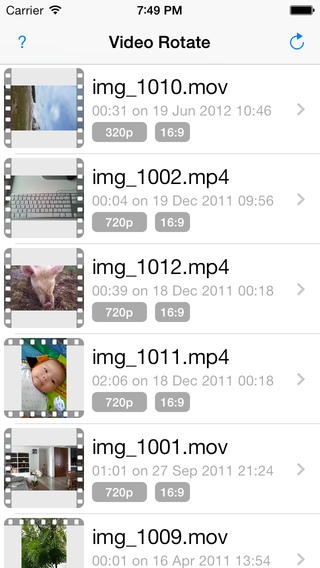
Video Rotate solves the problem of your iPhone or iPad incorrectly detecting orientation when shooting video and allows you to correctly rotate video.
Video Rotate provides two methods of rotation, fast-but-less-compatible (metadata) and slow-fully-compatible (frame-by-frame) rotation. Video Rotate rotates videos in your camera / import albums through 90, 180 or 270 degrees (compatible with most MPEG-4; .MOV, .MP4 format files).
Help us to help you, any user who is experiencing difficulty please contact us directly for support: phil@gadgetjuice.com
Video Rotate provides two methods of rotation, before use please read the descriptions below to understand the difference.
Fast mode - only the orientation flag of the video file is modified, no transcoding of data occurs. This mode is completely lossless and is compatible with iOS and Quicktime, however some media players (notably PC based) do not honor the orientation flag.
Slow mode - the video is decoded, rotated and encoded frame by frame. The resulting video file is compatible with all media players (and online services). Compression settings are duplicated from the original (hence file sizes will be similar).
Note that rotations to 0 are always carried out in fast mode as there is no frame rotation to be carried out.
Because of iOS security restrictions Video Rotate cannot remove the old video file, you must do this manually in the gallery.
Video Rotate can not rotate DRM protected movies or shows downloaded from iTunes.
Location permission (iOS 5 and lower)
In order to access your media library Video Rotate must first ask you for permission to 'Determine Your Location'. This standard Apple alert indicates that Video Rotate is asking for permission to access your media library which can include GPS location in metadata. Note that we never actually access the location information in your videos.
If upon first startup you select 'Don't Allow' your device will remember this and there is no way for us to ask for the permission again, you must enable permission in your device Settings -> Location Services.
Requires iOS 6.0 or later. Compatible with iPhone, iPad, and iPod touch.
About Video Rotate
The company that develops Video Rotate is Gadget Juice. The latest version released by its developer is 3.0.1.
To install Video Rotate on your iOS device, just click the green Continue To App button above to start the installation process. The app is listed on our website since 2012-05-31 and was downloaded 0 times. We have already checked if the download link is safe, however for your own protection we recommend that you scan the downloaded app with your antivirus. Your antivirus may detect the Video Rotate as malware if the download link is broken.
How to install Video Rotate on your iOS device:
- Click on the Continue To App button on our website. This will redirect you to the App Store.
- Once the Video Rotate is shown in the iTunes listing of your iOS device, you can start its download and installation. Tap on the GET button to the right of the app to start downloading it.
- If you are not logged-in the iOS appstore app, you'll be prompted for your your Apple ID and/or password.
- After Video Rotate is downloaded, you'll see an INSTALL button to the right. Tap on it to start the actual installation of the iOS app.
- Once installation is finished you can tap on the OPEN button to start it. Its icon will also be added to your device home screen.
Program Details
System requirements
Download information
Pricing
Version History
version 3.0.1
posted on 2012-05-31
Disclaimer
Official App Store Link
We do not host Video Rotate on our servers. We did not scan it for viruses, adware, spyware or other type of malware. This app is hosted by Apple and passed their terms and conditions to be listed there. We recommend caution when installing it.
The App Store link for Video Rotate is provided to you by apps112.com without any warranties, representations or guarantees of any kind, so access it at your own risk.
If you have questions regarding this particular app contact the publisher directly. For questions about the functionalities of apps112.com contact us.
